


CEB OnLAW Access for CJER Members
Changes coming January 1, 2026
Questions?
- Call CEB Customer Support at 1 (800) 232-3444
- Email our CEB Court Digital Specialist at courtsliaison@ceb.ucla.edu
Your CEB OnLAW access will change as of January 1, 2026.
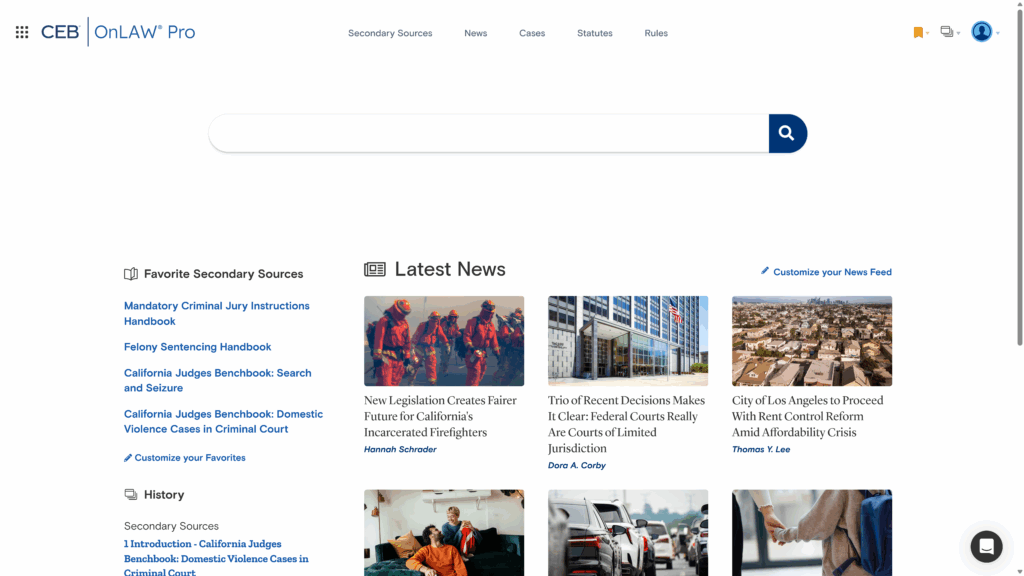
You currently have access to all CEB secondary sources on our legacy legal research platform, OnLAW®. As of January 1, your access will switch to CEB’s modern legal research platform, OnLAW Pro, where you will only have access to the four Benchbooks that CJER and CEB co-publish:
- California Judges Benchbook: Domestic Violence Cases in Criminal Court
- California Judges Benchbook: Search and Seizure
- California Judges Benchbook: Felony Sentencing Handbook
- California Judges Benchbook: Mandatory Criminal Jury Instructions
You will also have access to our full primary law database and news feed in OnLAW Pro.
Judges will continue to receive a physical copy of the Benchbooks’ annual updates, as they do now.
FREQUENTLY ASKED QUESTIONS
What is changing?
As of January 1, 2026, accessing CEB’s legal research platform through the CJER Online portal will look different.
- New legal research platform: Instead of accessing CEB’s secondary sources through our legacy research platform, OnLAW, you’ll access legal research content through our modern legal research platform, OnLAW Pro.
- Secondary sources: Your CEB access through the CJER Online portal will only provide digital access to the four Benchbooks that CJER and CEB co-publish:
- California Judges Benchbook: Domestic Violence Cases in Criminal Court
- California Judges Benchbook: Search and Seizure
- California Judges Benchbook: Felony Sentencing Handbook
- California Judges Benchbook: Mandatory Criminal Jury Instructions
- Additional content: With OnLAW Pro, you’ll have full access to the CEB News feed, which covers breaking legal news, legal analysis, practice management content, and longform reporting, as well as the full CEB primary law database.
How will I log in?
You will access OnLAW Pro the same way you previously accessed OnLAW:
- Log into the CJER Online portal.
- Click the CEB OnLAW Pro quick link; click Launch CEB OnLAW Pro.
- Enter the username and password listed in the CJER portal near the “Launch CEB OnLAW Pro” button.
- Jump into your research.
How do I access the four CJER Benchbooks?
Once you are logged into OnLAW Pro, you can find the four Benchbooks under Favorite Secondary Sources” on the left side of the homepage. Or you can click Secondary Sources at the top to be taken to the dedicated landing page.
On the homepage or on the Secondary Sources landing page, click the title you want to access, and navigate through the book using the table of contents on the left.
NOTE: Judges will also continue to receive a physical copy of each book when they are updated annually.
What are the differences between OnLAW and OnLAW Pro?
OnLAW Pro is designed to provide a more modern, intuitive research experience, while maintaining the trusted capabilities of OnLAW. Below is a brief overview of the same functionality between the two platforms.
For a more in-depth introduction to OnLAW Pro, view the OnLAW Pro Onboarding resource page, where you can find videos, a getting started guide, and additional FAQs.
Accessing a title
Secondary source search
OnLAW Pro still supports searches using keywords and Boolean terms and connectors, but it also supports natural language search for broader, context-driven results. OnLAW Pro also understands common legal acronyms and abbreviations, like MSJ and CEQA.
Each time a search is entered, the search is performed across all content types – secondary sources, news, cases, statutes, and rules. The All page shows the top three search results from each content type.
Searching within a title
Primary law search
OnLAW Pro recognizes common code name abbreviations, and will search for cases using the case names or citation in any format.
Printing and downloading
Full primary law access
In OnLAW, you can only access the primary law that is cited throughout the secondary sources. There was no direct access to primary law.
OnLAW Pro gives you direct, searchable access to our full primary law database, and when you click a primary law citation in a secondary source, it appears in the lower right corner of the screen to help you maintain your focus on the research.
Copy with cite
Not available in OnLAW.
How can I get access to all CEB secondary sources?
You can contact our Court Digital Specialist via email at courtsliaison@ceb.ucla.edu to get more information.
Will my access to CEB products outside of OnLAW change?
No. This change in access is unrelated to any CEB Essential Forms, Attorney’s BriefCase, or print subscriptions your court may have.
Questions?
Call CEB Customer Support
1 (800) 232-3444
Email our Court Digital Specialist
courtsliaison@ceb.ucla.edu